4.8. Partitions
Partitions provide a logical separation mechanism within suSSHi, enabling the independent management of isolated datasets such as users, policy rule sets, configuration settings, and associated gateway groups.
4.8.1. Gateways
suSSHi Gateways are the distributed access components of the suSSHi platform, responsible for securely handling incoming SSH connections and enforcing centrally defined security policies. They operate as stateless enforcement points, relying on suSSHi Chef for all policy decisions and configuration data to ensure consistent and centrally governed access control.
4.8.1.1. List of Gateways
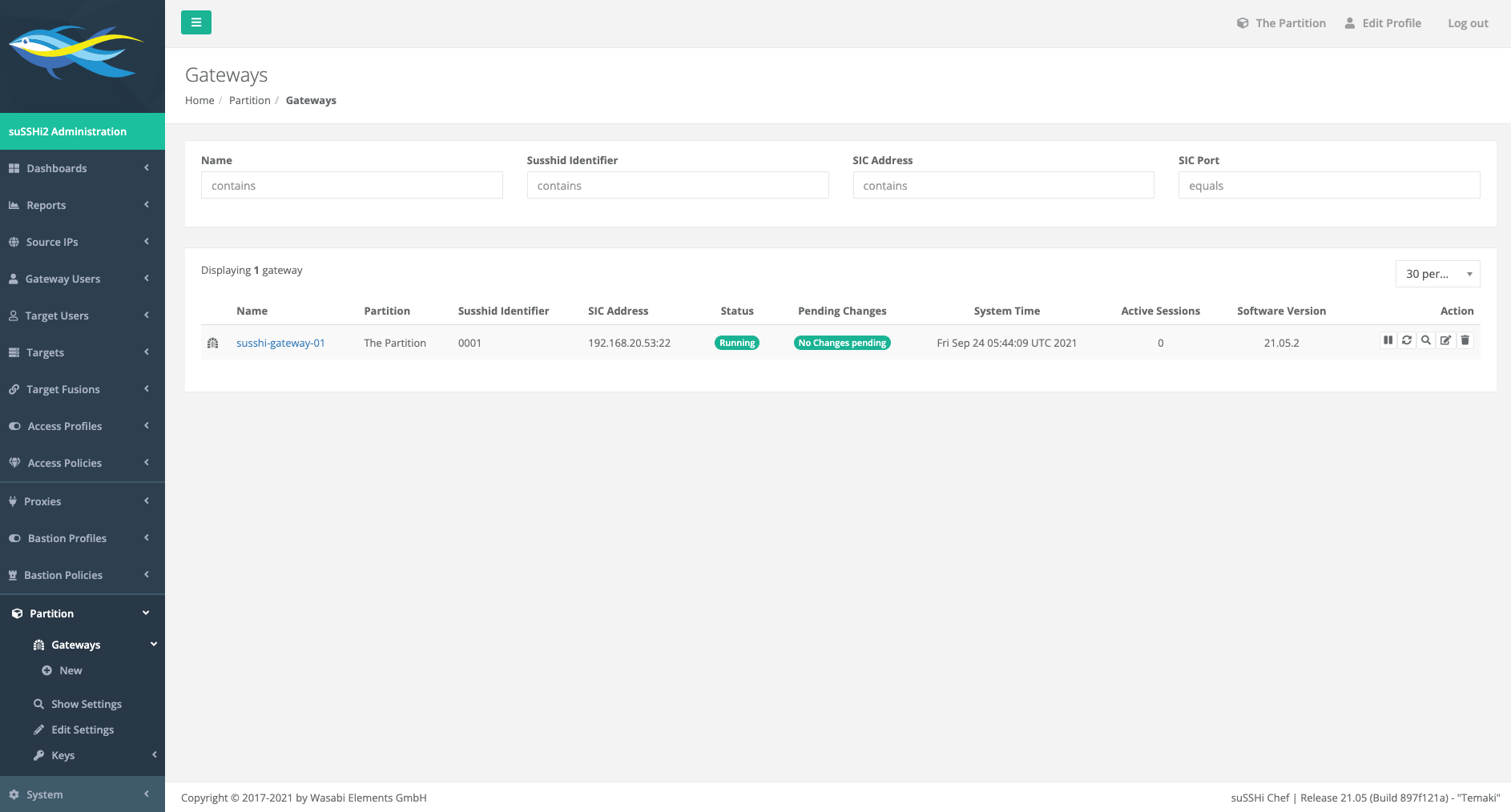
The overview page provides a centralized summary of all suSSHi Gateway instances and their current operational state. It combines identification, connectivity, and security-related information with runtime status and configuration details to give administrators a comprehensive view of the system at a glance. In addition, it reflects the health of secure communication channels, the validity of cryptographic credentials, and the current system load and activity. Administrative controls are also available to enable direct management of individual gateway instances from a single interface.
4.8.1.2. Adding a new Gateway
To create a new gateway in suSSHi Chef, navigate to the gateway configuration section and provide the required connection details. During the creation process, the following fields are available:
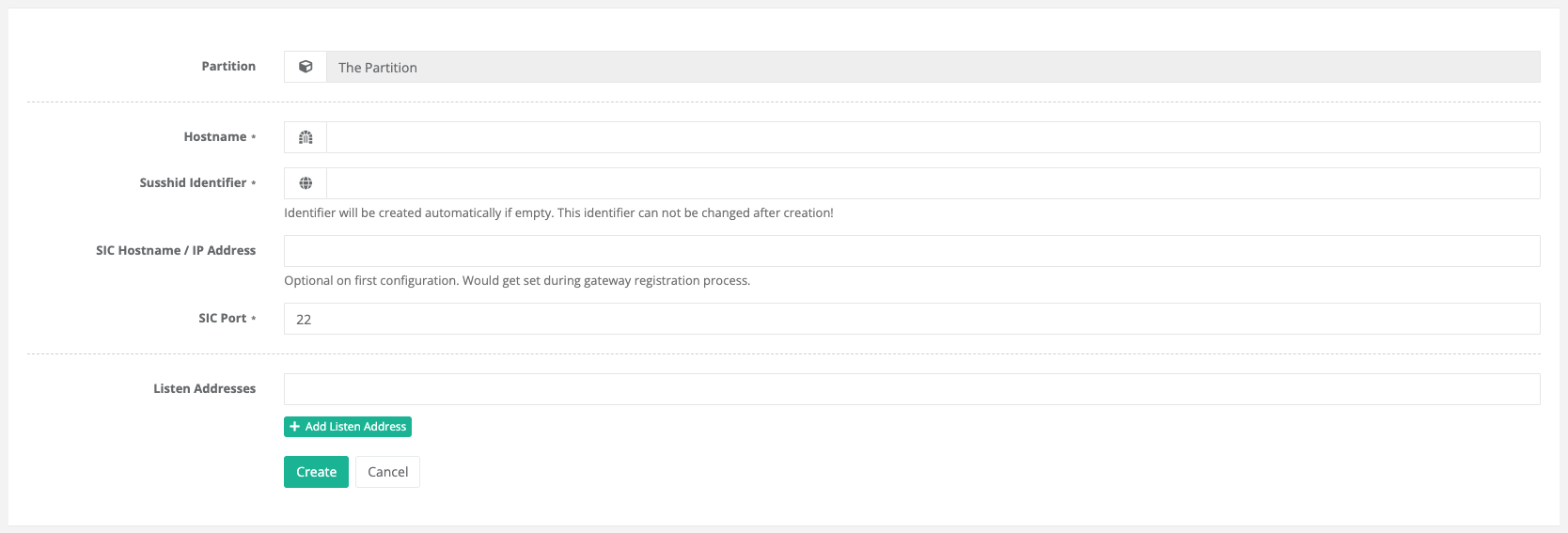
- Partition
The partition is automatically determined by the globally selected partition and therefore does not need to be configured separately.
- Hostname
Mandatory field that defines the hostname of the gateway or system instance.
- Susshid Identifier
Optional field. If left empty, the identifier is generated automatically during the creation process.
- SIC Hostname / IP Address
Optional during the initial configuration.
This value is automatically updated during the gateway registration process once the SIC connection has been established.
- SIC Port
Defines the SIC communication port.
Default:
22
- Listen Addresses
Optional field used to define one or more listen addresses for incoming connections.
4.8.1.3. Gateway Information
The gateway overview page provides a centralized view of the current gateway configuration and operational state. It allows administrators to quickly verify important system information, monitor the gateway status, and access operational actions such as restarting or shutting down the gateway.
In addition to general system information, the page also displays details about the Secure Internal Communication (SIC) configuration, including the currently configured hostname, certificate identifier, and certificate validity period.

4.8.2. Settings
Each partition represents an isolated and independent dataset within suSSHi, including its own gateways, users, targets, policy rule sets, and operational settings. This separation allows multiple environments to coexist securely within a single suSSHi installation.
4.8.2.1. Show Settings
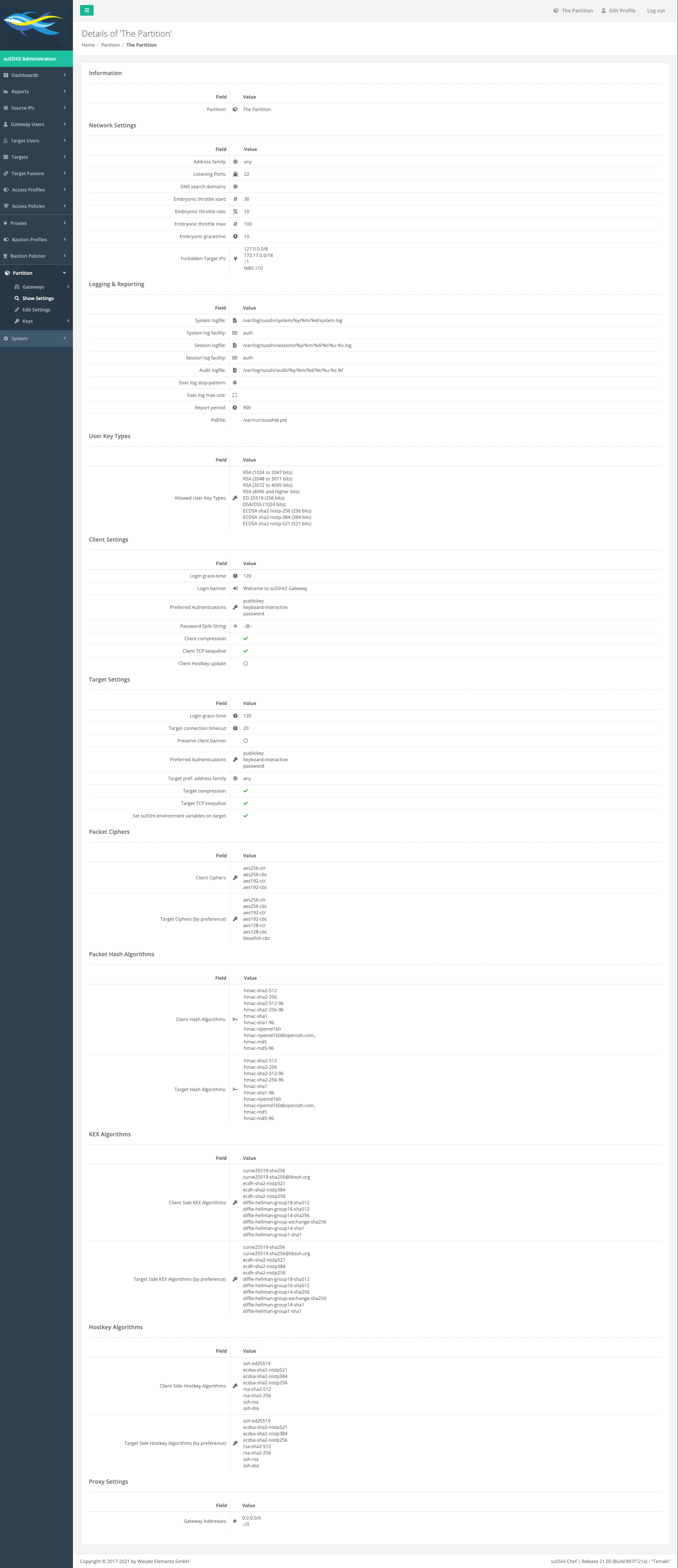
The settings overview page summarizes the available configuration categories and allows administrators to manage partition-specific behavior, resources, gateways, users, targets, and policy-related settings. Detailed descriptions and configuration options for individual areas are covered in the corresponding subsections of this documentation.
4.8.2.2. Edit Settings
Network
These settings configure the network communication behavior of the partition and define how gateway services handle incoming and outgoing connections.
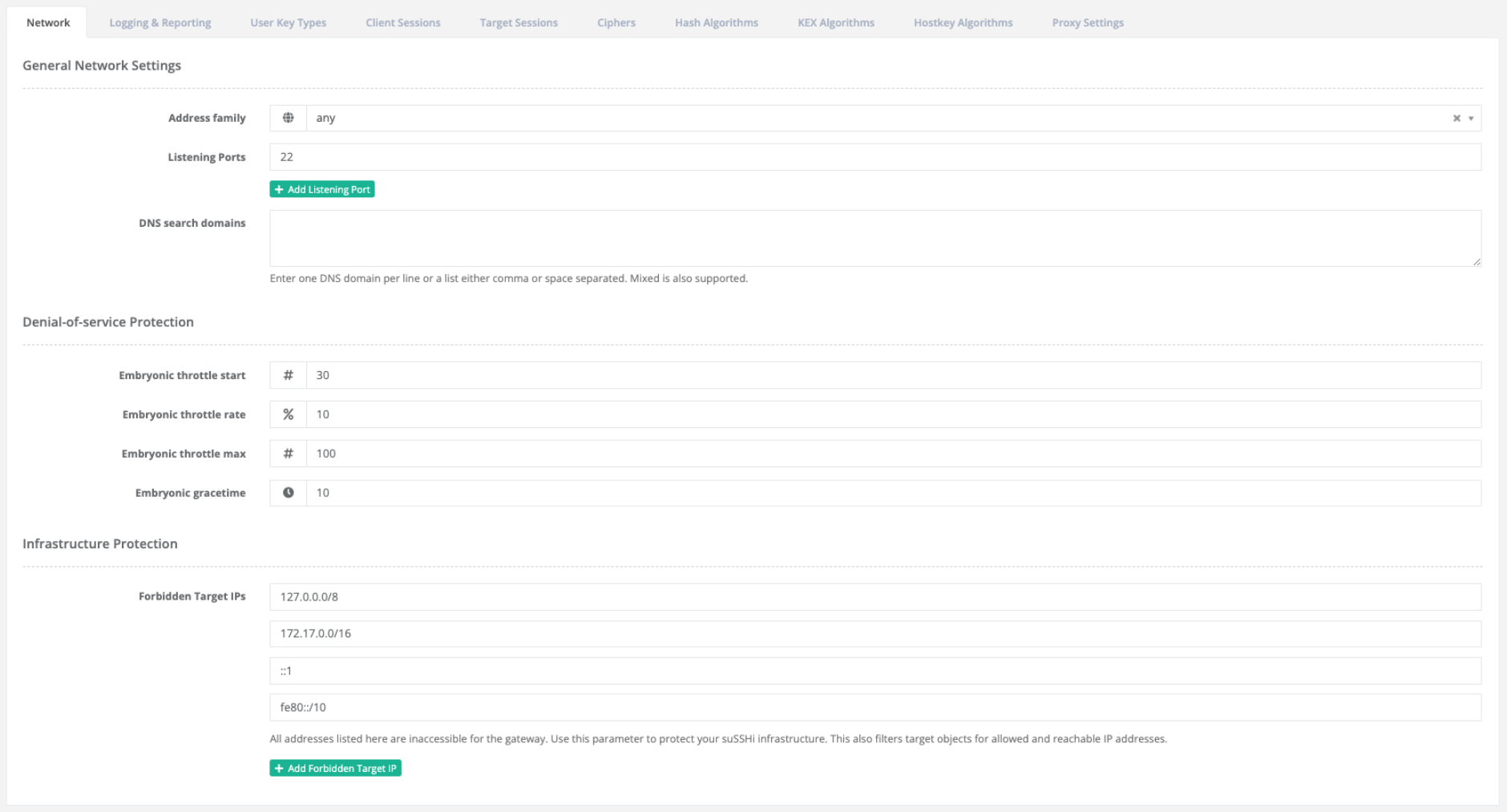
- General Network Settings
The address family setting specifies whether IPv4, IPv6, or both protocol families are used. Listening ports define the network ports on which the gateway services are exposed and accept client connections. DNS search domains can be configured to simplify hostname resolution within the managed environment.
- Denial-of-service Protection
The denial-of-service protection settings provide basic safeguards against excessive or malicious connection attempts. The embryonic throttle parameters control how partially established connections are rate-limited and managed during high connection loads.
- Infrastructure Protection
Infrastructure protection settings protect your infrastructure by defining forbidden target addresses. Forbidden target IPs can be configured to prevent access to specific systems or network ranges that must not be reachable through the partition.
Logging & Reporting
These settings control the logging and reporting behavior of the partition, including session reporting intervals, command execution logging, and system log integration.

- Session Reporting
The session reporting settings define how frequently session-related information and statistics are generated and updated.
- Exec Logging
The exec logging settings control the logging behavior for executed commands and related session output.
- System Log Facilities
The system log facility settings define which syslog facilities are used for system-related and session-related log messages.
User Key Types
User Key Types define which cryptographic key algorithms are permitted for user authentication within the partition.
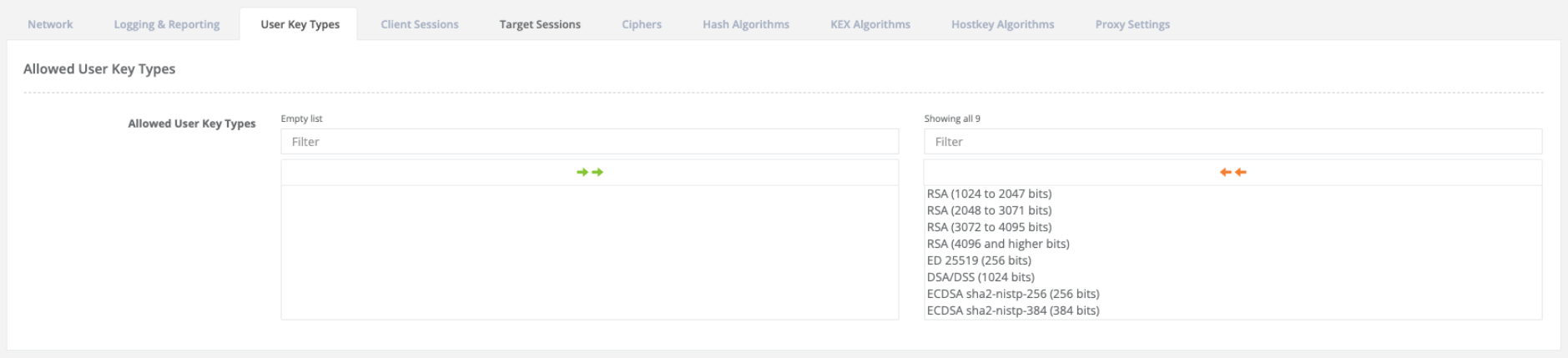
Restricting the allowed key types can help enforce organizational security policies and prevent the use of deprecated or insecure cryptographic algorithms. The selected algorithms should balance compatibility requirements with current security best practices.
Public Key Algorithms
Public Key Algorithms define which cryptographic algorithms are permitted for SSH public key authentication and key exchange operations within the partition.
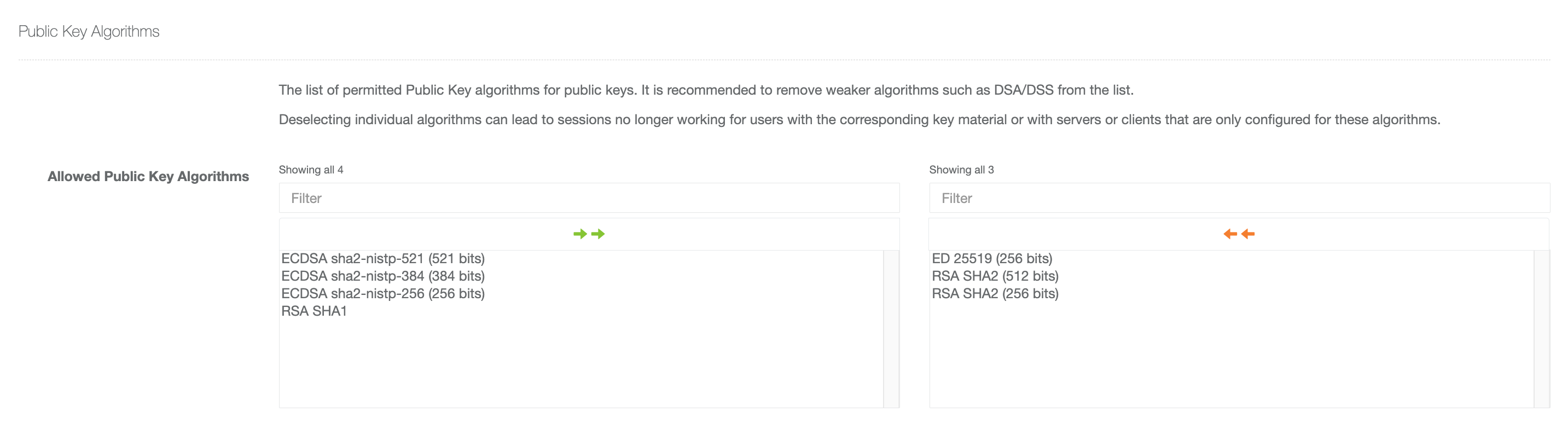
Limiting the allowed algorithms helps enforce security policies, improve cryptographic standards compliance, and prevent the use of deprecated or insecure algorithms. The selected algorithms should balance compatibility requirements with current security best practices.
Client Sessions
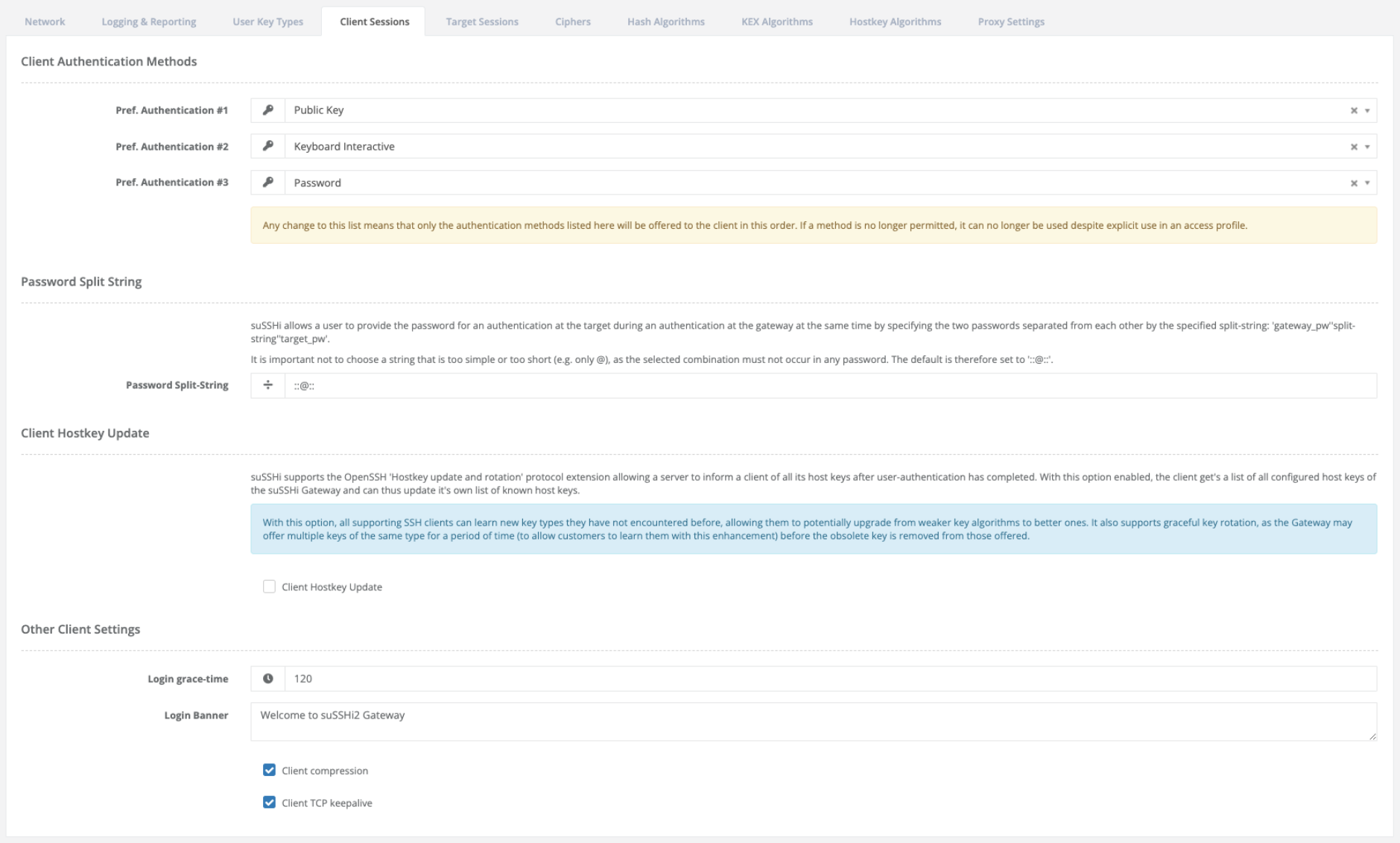
The client session settings define how users authenticate and interact with the suSSHi Gateway during SSH session establishment.
- Client Authentication Methods
Client authentication methods define which authentication mechanisms are offered to connecting SSH clients and in which order they are preferred. Any modification of the configured authentication list restricts the available methods to the explicitly configured entries.
Warning
Authentication methods that are no longer permitted cannot be used, even if they are still referenced by existing access profiles.
- Password Split String
The password split-string feature allows users to provide both the gateway password and the target password during a single authentication step. The passwords must be separated using the configured split-string. To avoid accidental password parsing conflicts, the configured separator should be sufficiently complex and uncommon.
- Client Hostkey Update
Client hostkey update support enables the OpenSSH host key rotation and update extension. After successful user authentication, the gateway can provide the client with all configured host keys. This allows SSH clients that support this extension to automatically learn additional key types, simplify key rotation procedures, and migrate to stronger cryptographic algorithms over time.
- Disconnect Message
Disconnect message settings control how much information is returned to users when authentication failures or session errors occur. In normal operation, disconnect messages remain intentionally generic to avoid exposing unnecessary information to potential attackers.
Note
Enabling verbose disconnect messages is not recommended for Internet-facing gateways or untrusted environments.
- Other Client Settings
Additional client settings define operational connection behavior such as login grace-time, login banners displayed during authentication, SSH compression support, and TCP keepalive handling. These options allow further customization of the client connection experience and session stability.
Target Sessions
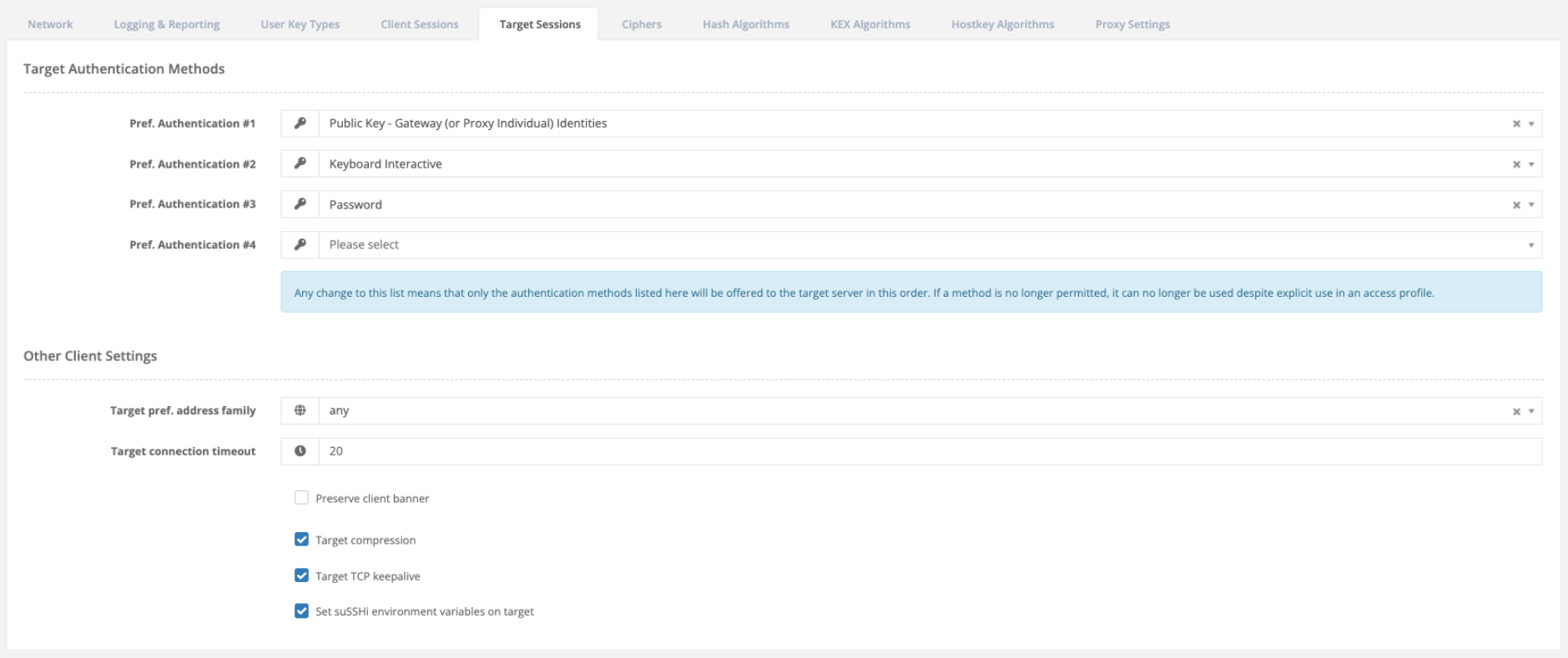
The target session settings define how the suSSHi Gateway establishes and manages SSH connections to target systems.
- Target Authentication Methods
Target authentication methods specify which authentication mechanisms may be used when the gateway authenticates against a target system and in which order they are attempted. Any modification of the configured authentication list restricts the available methods to the explicitly configured entries.
Warning
Authentication methods that are no longer permitted cannot be used, even if they are still referenced by existing access profiles.
Authentication using public keys allows the gateway, or optionally proxy-individual identities, to authenticate against target systems using configured SSH identities. Additional authentication mechanisms such as user-individual public keys (auth-agent forwarding), keyboard-interactive or password authentication may also be enabled depending on the target environment requirements.
- Other Target Settings
Additional target session settings control connection behavior and protocol handling for outbound SSH sessions. The preferred address family setting determines whether IPv4, IPv6, or any available protocol family should be used when connecting to target systems. The target connection timeout defines how long the gateway waits for a target connection attempt before aborting the session establishment.
Optional settings such as preserving the original client banner, enabling SSH compression, or activating TCP keepalive handling can be used to optimize compatibility and session stability. suSSHi-specific environment variables may also be exposed to the target system to provide additional session context or integration capabilities.
Note
Usually, specific environment variables must be explicitly permitted in the target server configuration before they can be accepted and processed during session establishment.
Ciphers
suSSHi supports multiple encryption algorithms for securing communication between clients and target systems. Cipher configuration allows administrators to define which algorithms are permitted and in which order they should be negotiated. During connection establishment, suSSHi automatically selects the highest-priority algorithm supported by both communication endpoints.
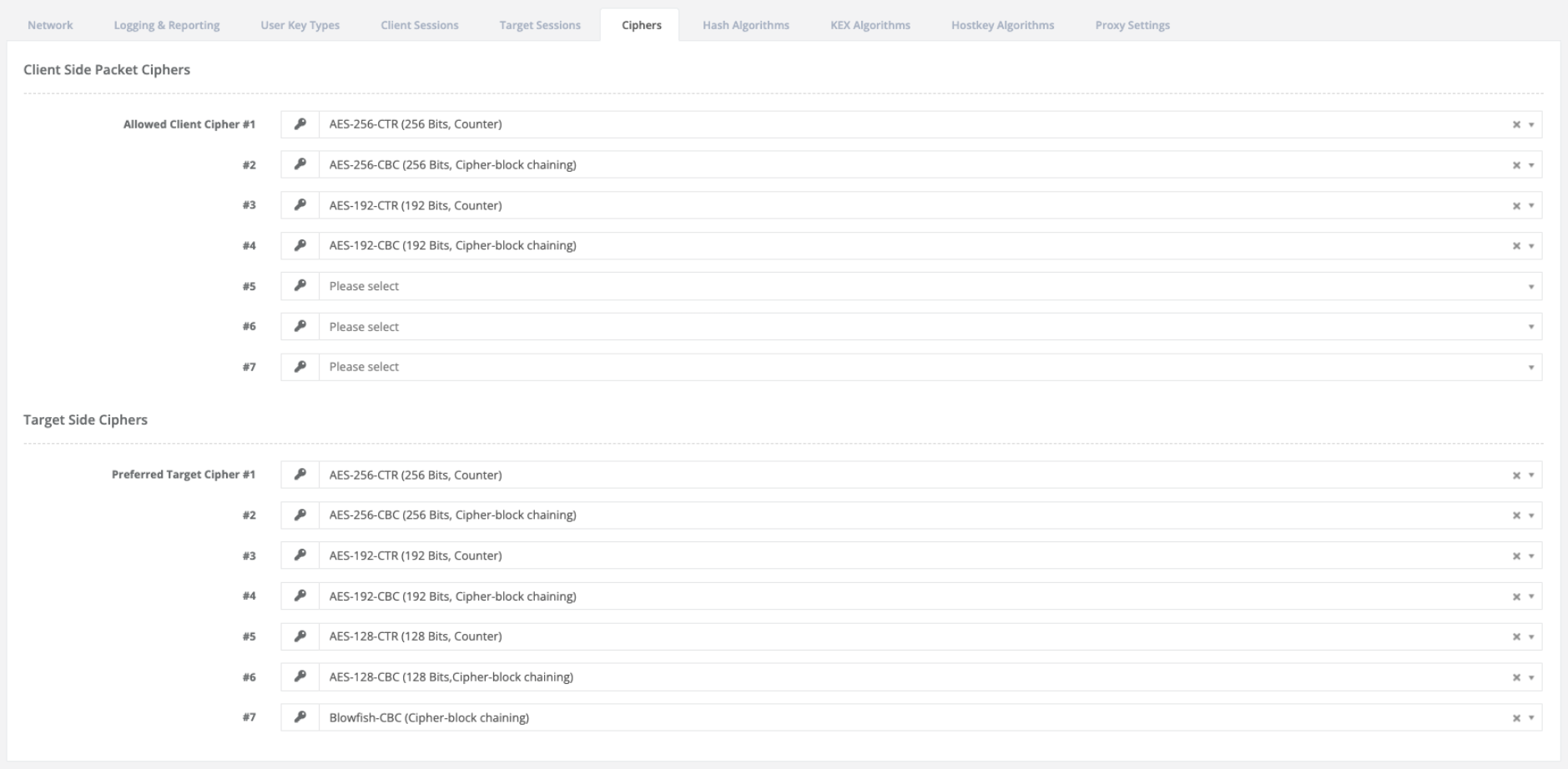
- Client Side Packet Ciphers
The client-side cipher configuration controls which encryption algorithms are accepted for incoming client connections.
Cipher negotiation follows the configured priority:
Entry #1 is treated as the preferred cipher.
Lower entries are used if higher-priority algorithms are unavailable.
Empty entries are skipped automatically.
- Target Side Ciphers
Target-side cipher settings define the preferred algorithms used for establishing encrypted connections to remote target systems. The negotiation logic is identical to the client-side configuration.
Hash Algorithms
Cryptographic hash algorithms are used to protect SSH communications against packet manipulation and integrity violations. The configured algorithms ensure that transmitted data can be verified and authenticated during a session. During SSH negotiation, suSSHi automatically selects the strongest mutually supported hash algorithm available between both communication partners.
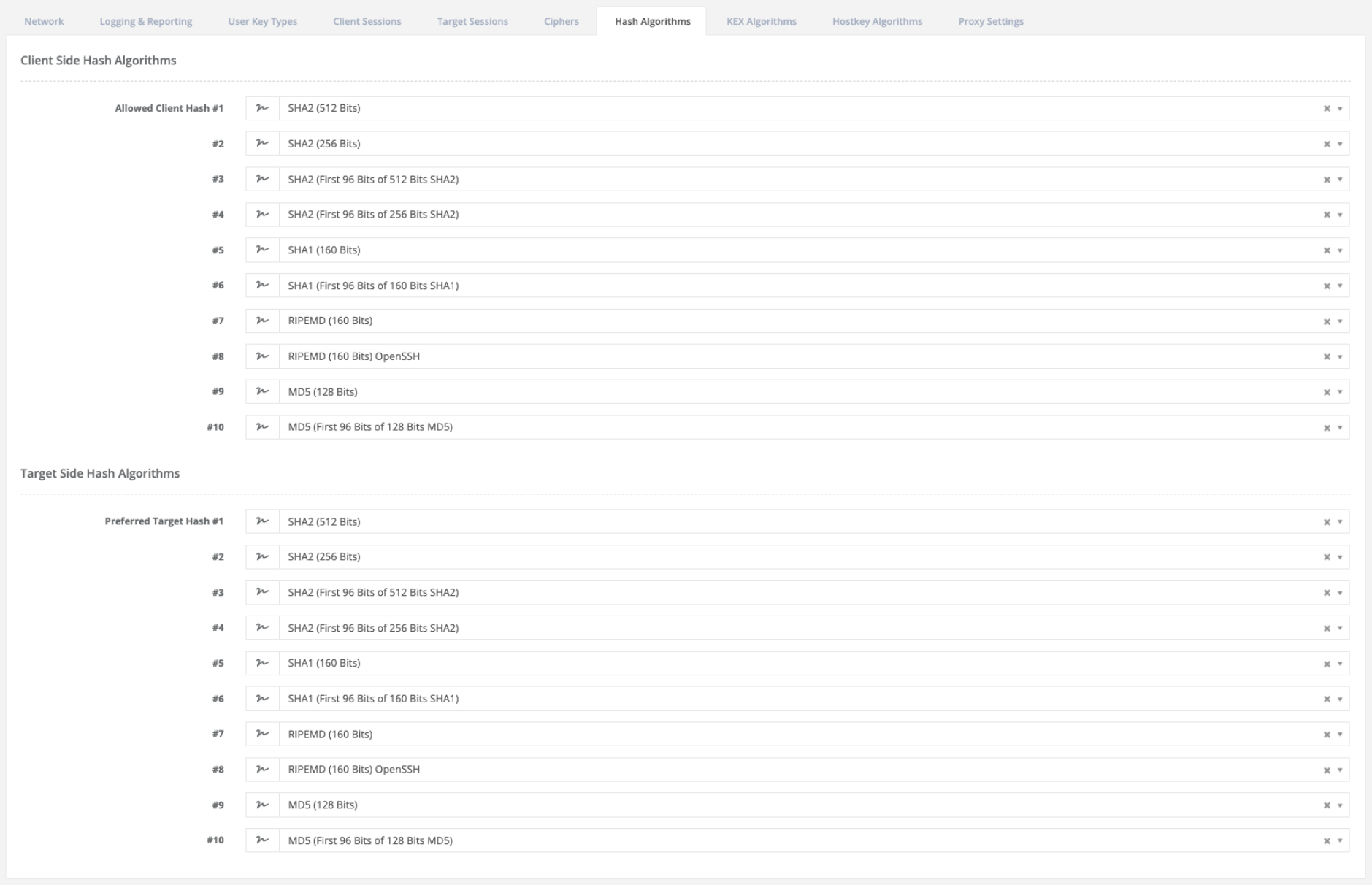
- Client Side Hash Algorithms
The configured order determines the negotiation priority:
Entry #1 has the highest priority.
Lower entries are used as fallback options.
Unused entries are ignored automatically.
- Target Side Hash Algorithms
Target-side hash settings control which integrity verification algorithms are preferred when connecting to remote target systems. The negotiation logic is identical to the client-side configuration.
KEX Algorithms
Key Exchange (KEX) algorithms define how cryptographic session keys are securely negotiated between client and target system. This process is fundamental to SSH security, as it ensures that both parties derive shared secrets without transmitting them directly over the network.

- Client Side KEX Algorithms
Client-side KEX settings define which key exchange methods are permitted when initiating SSH connections.
Negotiation behavior:
Entry #1 has the highest priority.
Lower entries are used as fallback options.
Unused entries are ignored automatically.
- Target Side KEX Algorithms
Target-side KEX settings define the preferred key exchange algorithms when connecting to remote systems. The negotiation logic is identical to the client-side configuration.
Hostkey Algorithms
Host key algorithms define how the identity of a server is verified during the SSH handshake. They are used to ensure that clients are connecting to the correct system and not to an impersonating host. Unlike other cryptographic components, host key settings directly affect trust establishment between endpoints.
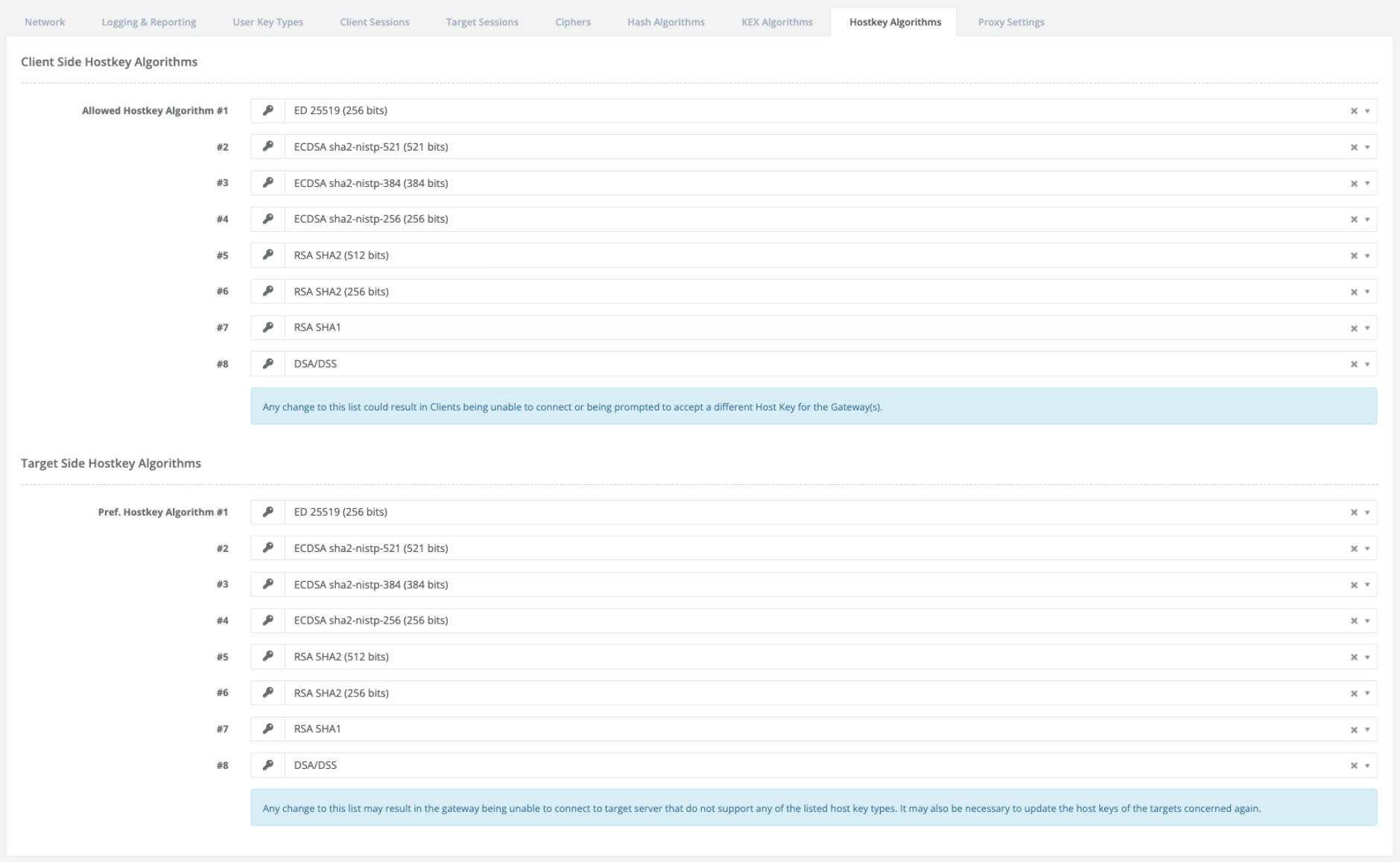
- Client Side Hostkey Algorithms
Client-side host key settings define which host key types are accepted when connecting to a gateway system.
The order of entries determines which host key is preferred during verification:
Entry #1 has the highest priority.
Lower entries are used as fallback options.
Unused entries are ignored automatically.
Note
Any modification of this list can result in clients being unable to connect or being prompted to accept a different host key for the gateway system.
- Target Side Hostkey Algorithms
Target-side host key settings define which host key types are preferred when suSSHi connects from a gateway to a target system. The negotiation logic is identical to the client-side configuration.
Proxy Settings
The trusted gateway address configuration defines which source networks are allowed to initiate proxy connections. Only connections originating from explicitly trusted IP ranges are permitted to use the proxy functionality.

4.8.3. Partition Keys
Partition keys define which cryptographic keys are available within different operational contexts of suSSHi. They control how authentication and host verification keys are separated and exposed depending on the direction and role of a connection.
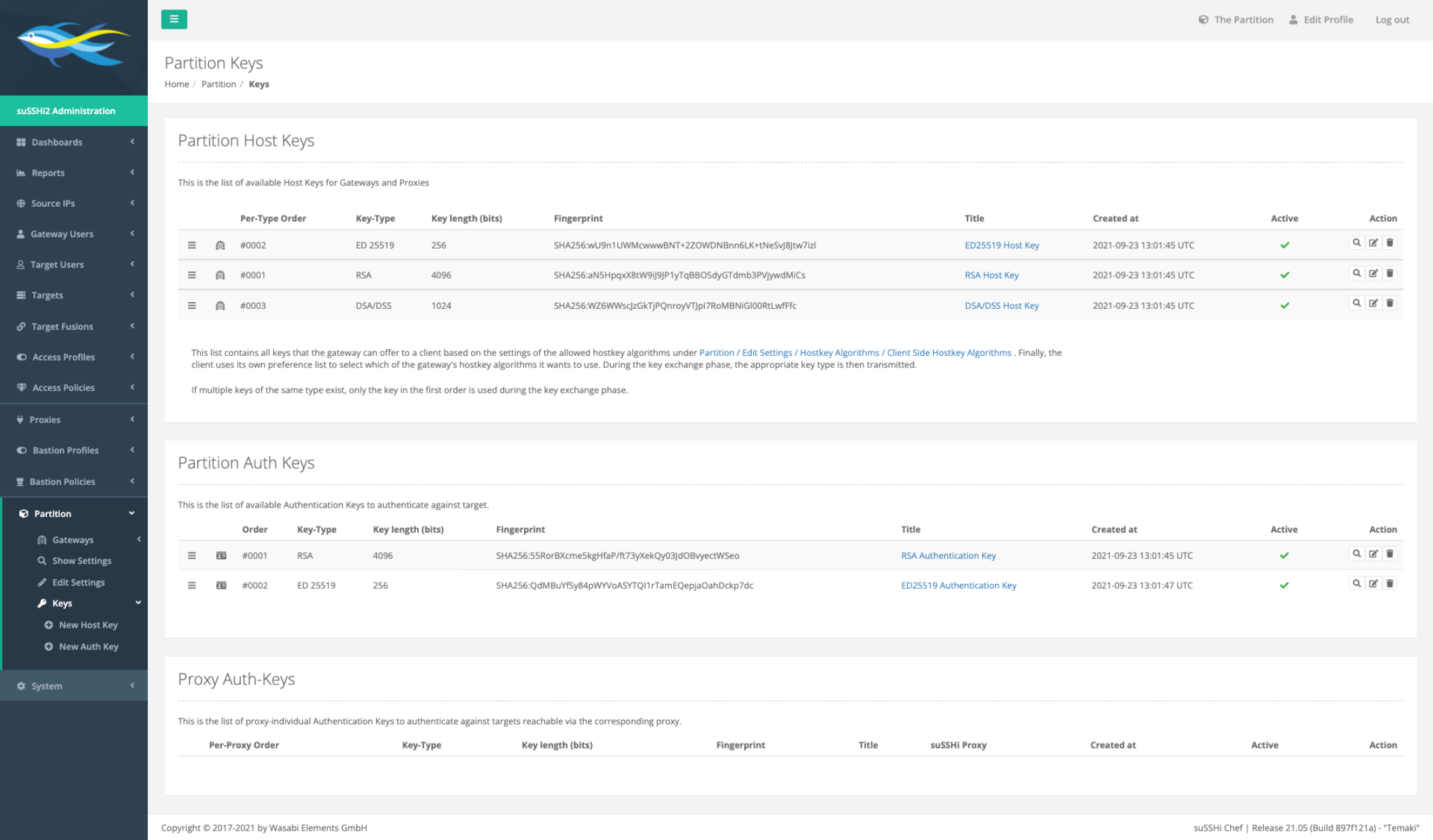
- Partition Host Keys
Partition Host Keys represent the identity of the gateway system and are shared across all gateways within a partition.
- Partition Authentication Keys
Partition Authentication Keys are used for outbound connections to target systems and are shared across all gateways within a partition.
- Proxy Authentication Keys
Proxy Authentication Keys are bound to the proxy context and are not shared globally across all connections.
4.8.3.1. New Host Key
Host keys are essential for identifying gateway systems during SSH communication and ensuring trust between clients and gateways. A new cryptographic host key can be created and assigned to a specific partition, allowing the gateway identity to be defined or updated as required. This mechanism enables flexible management of host keys, including the ability to replace or switch the active key used for SSH host verification without affecting other partitions.
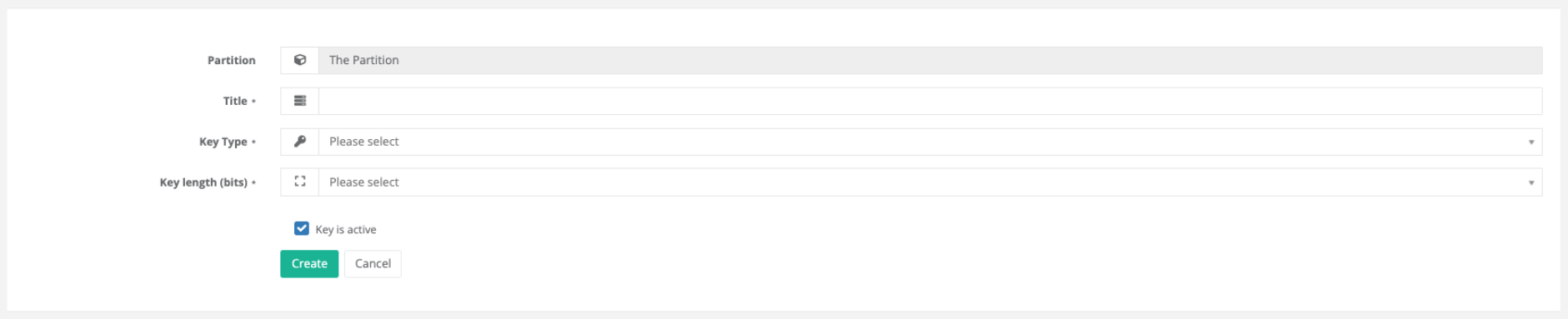
- Partition
The partition is automatically determined by the globally selected partition and therefore does not need to be configured separately.
- Title
A human-readable label for the host key. This title is used for identification purposes in configuration views and logs. It does not affect the cryptographic behavior of the key.
- Key Type
Specifies the cryptographic algorithm used to generate the host key. Only supported key types can be selected from the available list.
- Key Length (bits)
Defines the strength of the host key in bits. Higher values increase cryptographic strength but may impact performance or compatibility depending on the selected key type.
- Key is Active
Determines whether the host key is enabled after creation.
If enabled, the key can immediately be used by the gateway.
If disabled, the key is stored but not used for any connections.
Deactivated keys can be activated later without regeneration.
4.8.3.2. New Auth Key
Authentication keys are used to authenticate gateway connections to target systems and ensure secure access by verifying the identity of the gateway during SSH communication. A new authentication key can be created and assigned within a specific partition to control access to target systems. This mechanism allows flexible management of credentials, including the ability to define, replace, or activate authentication keys without impacting other partitions or existing configurations.

- Title
A human-readable label for the authentication key. This title is used for identification purposes in configuration views and logs. It does not affect the cryptographic behavior of the key.
- Key Type
Specifies the cryptographic algorithm used to generate the authentication key. Only supported key types can be selected from the available list.
- Key Length (bits)
Defines the strength of the authentication key in bits. Higher values increase cryptographic strength but may impact performance or compatibility depending on the selected key type.
- Key is Active
Determines whether the authentication key is enabled after creation.
If enabled, the key can immediately be used for authentication against target systems.
If disabled, the key is stored but not used for any connections.
Deactivated keys can be activated later without regeneration.